Improve / Progressive Overload
Improve is a user-friendly, web-based app designed to help you track your improvement in any topic you choose. Whether you want to improve your health and fitness, learn a new skill, or develop a new hobby, Improve provides you with the tools and resources you need to stay motivated and on track.
One of Improve's standout features is its easy-to-use interface. The app is incredibly simple to download and use, with no complicated connections or integrations required. Once you're up and running, you can input your progress, set goals, and track your improvement over time.
In short, Improve is a friendly and accessible tool for anyone looking to track and improve their progress in any topic. With easy-to-use, Improve makes it easy to stay motivated and on track towards your goals.
Screens & Usage
Topic List

On this screen, you'll find all of your tracked topics with their initial and target values displayed. If you want to create a new topic, just click the plus button located on the left side of the navbar.
Analytics
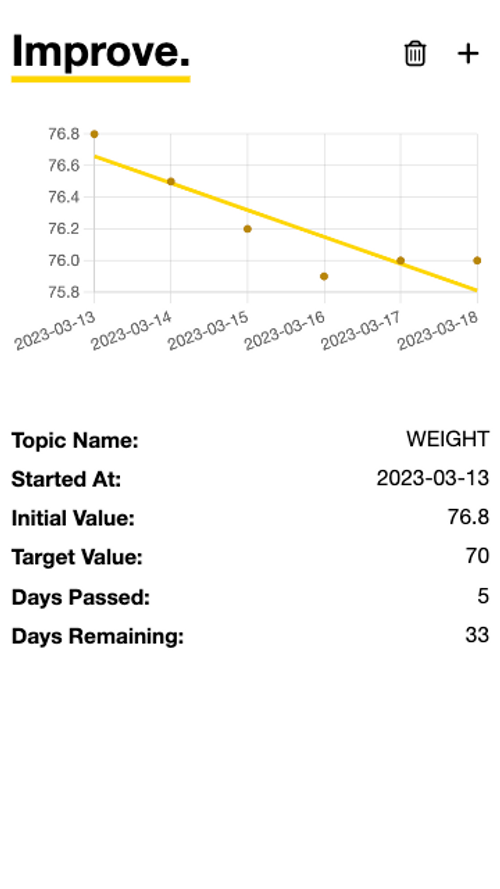
This screen displays your improvement journey on the chart above. Each point on the chart represents an individual record, while the line displays your overall movement towards your goal. To add a new iteration, just click the Plus button located on the left side of the navbar.
Below the chart, you'll find the analytics component, where you can see information about your progress towards specific tasks, as well as the remaining time until you reach your target based on your movement on the chart. To delete the topic, simply click the Trash button located in the navbar.