Progress / Habit Tracker
Tracking your habits has become easier than ever before. This is where our practical tracking app comes in. Our app is specifically designed to help you set achievable goals and track your progress with ease.
With Progress App, you no longer have to worry about the hassle of manually tracking your habits on a piece of paper or using multiple apps for different habits. Our app is a one-stop-shop for all your habit tracking needs. You can easily set daily and weekly goals, and the app will keep track of your progress.
But that's not all. Our app also offers a variety of customizable features that make habit tracking even more practical and personalized. You can customize the app to match your specific habits and preferences, and you can even choose from a variety of tracking methods, such as checklists or progress bars.
In short, Progress App is the solution for anyone looking to develop new habits or break bad ones. With its easy-to-use interface, customizable features, and practical goal-setting and tracking capabilities, the app will help you achieve your goals and stay on track, no matter what your habits may be. So why wait? Start tracking your way to a better life!
Screens & Usage
Dashboard
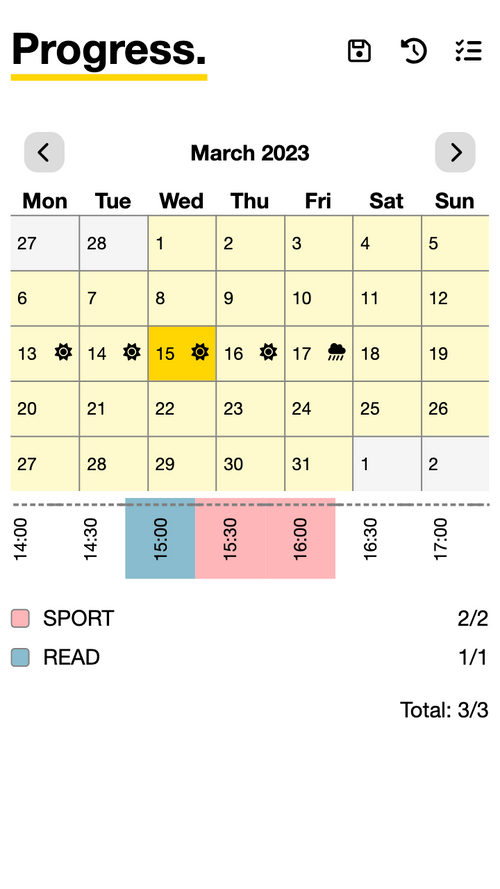
With the dashboard, you can easily track your goals and daily tasks. The Calendar component provides an intuitive visual representation of your daily task status, with a sun icon indicating that you've successfully completed all tasks, and a rainy icon indicating that some tasks were left incomplete. The Timeslots component allows you to see which tasks were completed during specific timeslots, providing you with insights into your daily productivity patterns. Additionally, the Task List component presents your daily tasks in a clear and organized manner, along with a ratio of completed task slots to the total number of tasks slots, so you can easily track your progress and stay motivated to achieve your goals.
You can navigate to the All Tasks page located on the left-hand side of the navbar. You can also access the IO page by clicking the disk icon on the navbar. This page allows you to import or export task data to and from your local storage. Additionally, by clicking the Rewinding Time icon on the navbar, the calendar can be reset to today's date.
All Tasks
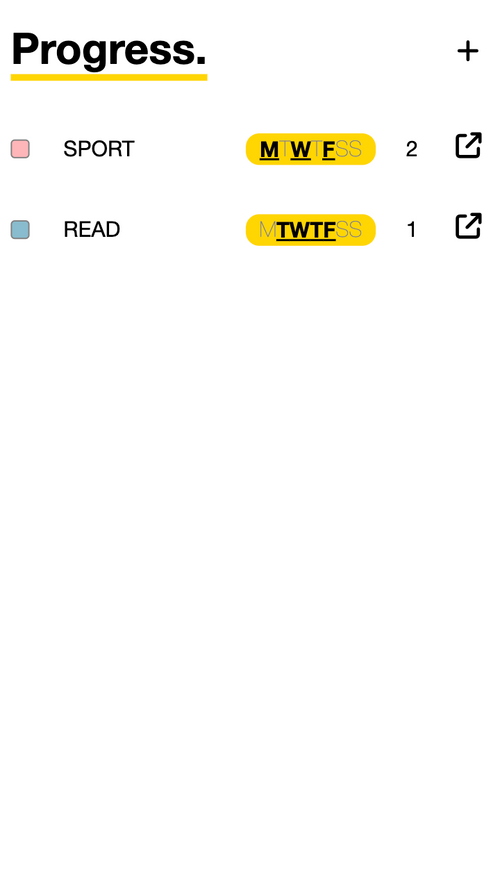
The list view provides a comprehensive overview of each task, including its color, name, scheduled days of the week, and daily to-do slot counts. Clicking on a task will take you to its Detail page, where you can view and modify its specific information. To create a new task, simply click on the plus button located on the navbar.
Create A New Task
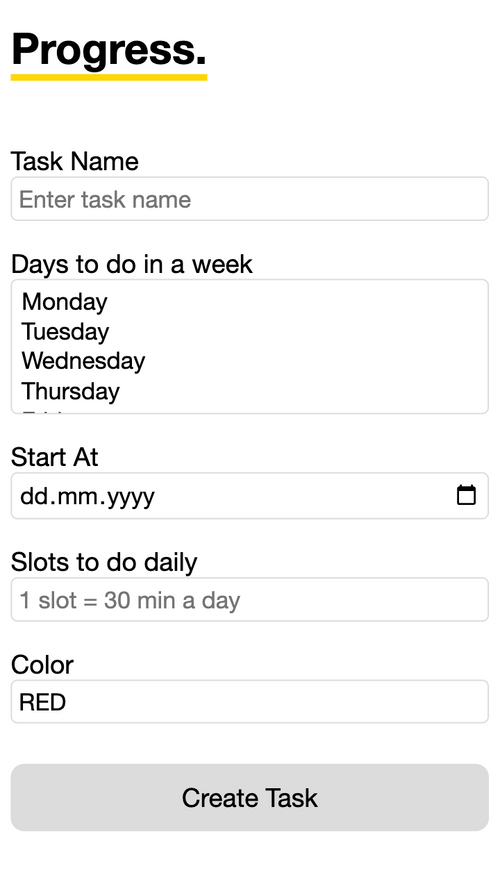
On this page, you have the ability to create new tasks. You can choose which days of the week you'd like to complete your task, and enter a time slot value to schedule it daily, with each slot representing a half hour. Additionally, you have the option to select a unique color for each task, making it easy to track and distinguish from other tasks on any page.
Task Detail
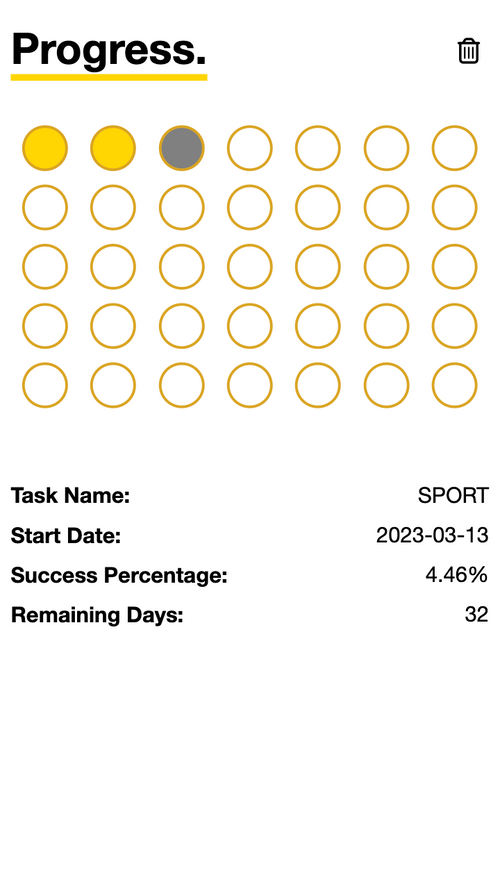
On this page, you'll find a detailed overview of all your tasks. The Coins Tracker component displays your task consistency, represented by coins that indicate the number of days you've to do the task since starting. A yellow coin indicates the task was completed for that day, a gray coin indicates the task was missed, and an empty coin indicates the day has yet to come.
In addition, the analytics section below the Coins Tracker displays your success percentage and remaining days needed to turn this task into a habit. This feature provides valuable insights into your task performance and progress towards building new habits. To delete a task, simply click the Trash button located in the navbar.